 I-COST
The right trigger is a recurring problem
A quantity surveyor opens three versions of a finishing tender. One contains the client's revised quantities, one has the latest supplier prices and one holds the director's final discount. Excel can calculate each perfectly; the team still has to decide which information is authoritative.
That is a useful trigger for reviewing construction estimating tools. The decision is less about whether spreadsheets are good or bad and more about how reliably your process controls scope, rates, revisions and handover. Specialist software is justified when it solves recurring problems at an acceptable total cost.
Why contractors continue to use Excel
Excel is familiar and adaptable. An estimator can build a bespoke rate analysis, inspect formulas, model alternative gang outputs and share a schedule with a client who uses the same format. If the business already licenses it, the incremental software cost may be small.
A disciplined workbook can have protected formulas, input validation, structured tables, independent checks and a controlled issue register. Cloud file storage can support co-authoring and version history. Those options should be assessed fairly rather than assuming every spreadsheet is an uncontrolled email attachment.
The trade-off is that someone must design, maintain and enforce these controls. A workbook that is excellent for one experienced estimator may be difficult for a buyer or replacement estimator to interpret. Include that maintenance and training effort in the comparison.
Compare the actual workflows
| Requirement | Controlled Excel process | Specialist software: check in a pilot |
|---|---|---|
| Rate libraries | Flexible tables or linked files; assign an owner and review dates. | Check rate reuse, source dates and how exceptions are approved. |
| BOQ revisions | Compare quantities and descriptions; retain issued versions. | Test import mapping, changed items and preservation of the accepted revision. |
| Formula errors | Protect formulas and reconcile independent totals. | Inspect calculation rules and test units, quantities and rounding. |
| Version control | Use managed storage, naming rules and an issue register. | Check locking, revision history, exports and recovery. |
| Collaboration | Co-authoring can work; agree ownership of packages and approvals. | Verify permissions and simultaneous editing in the actual product. |
| Buying handover | Transfer accepted quantities and budgets with reconciliation. | Test whether estimate items carry through to orders and reports. |
Rate libraries need judgement in either system
A reusable rate is a starting point, not an instruction to price every job identically. Record its specification, unit, geographical assumption, productivity basis and supplier evidence. A plastering rate for clear new-build walls may be unsuitable for patch repairs around occupied rooms.
Ask software vendors to demonstrate what happens to an old rate copied into a new tender. Does the estimator see the source and date? Can they update the material element without losing the labour assumption? Confirm those details rather than relying on the phrase “live rates”.
Revisions need scope control
A changed BOQ may add work, remove an item or alter the specification without changing the quantity. Compare descriptions and qualifications as well as totals. Keep the submitted revision, the agreed exclusions and the accepted selling price accessible to the buying team.
Software can organise the records, but it cannot decide whether an instruction is included in the contract. Nominate a person to reconcile revisions and obtain commercial approval. The practical BOQ guide explains the importance of consistent measurement and scope.
A realistic drylining subcontract example
Consider an illustrative £180,000 tender with 320 BOQ lines and two estimators. A revision adds 120 m² of lining. The assumed direct cost is £18 materials plus £22 labour per m², making £4,800 additional cost. These are invented teaching assumptions, not market rates or a reported customer case.
At a target 15% gross margin, the corresponding selling allowance is £4,800 ÷ 0.85 = £5,647.06 before VAT. Multiplying cost by 1.15 instead produces £5,520, which is a 15% markup and a lower margin. Both spreadsheet and software users should check the calculation convention.
In Excel, the control might be a revision comparison tab, expanded table formulas and an independent summary check. In specialist software, test the import, revision total, rate application and client quotation. The acceptance criterion is the same: the approved scope and correct allowance must reach the submitted offer.
When Excel is sufficient
Keeping Excel can be reasonable when tenders are straightforward, one accountable estimator controls the workbook, revisions are infrequent and the buying handover is manageable. It is also useful for unusual one-off analyses that do not fit a standard estimating structure.
Check evidence rather than choosing an arbitrary turnover threshold. Review recent tender corrections, time spent reconciling versions and how often a buyer has to retype estimate data. If those costs are small and controls work, changing systems may not be the current priority.
When specialist software is justified
A pilot becomes worthwhile when repeated revisions consume review time, several people need a common approved estimate or procurement repeatedly starts from disconnected data. Include subscriptions, onboarding, data cleansing, training and any duplicated work during transition in the business case.
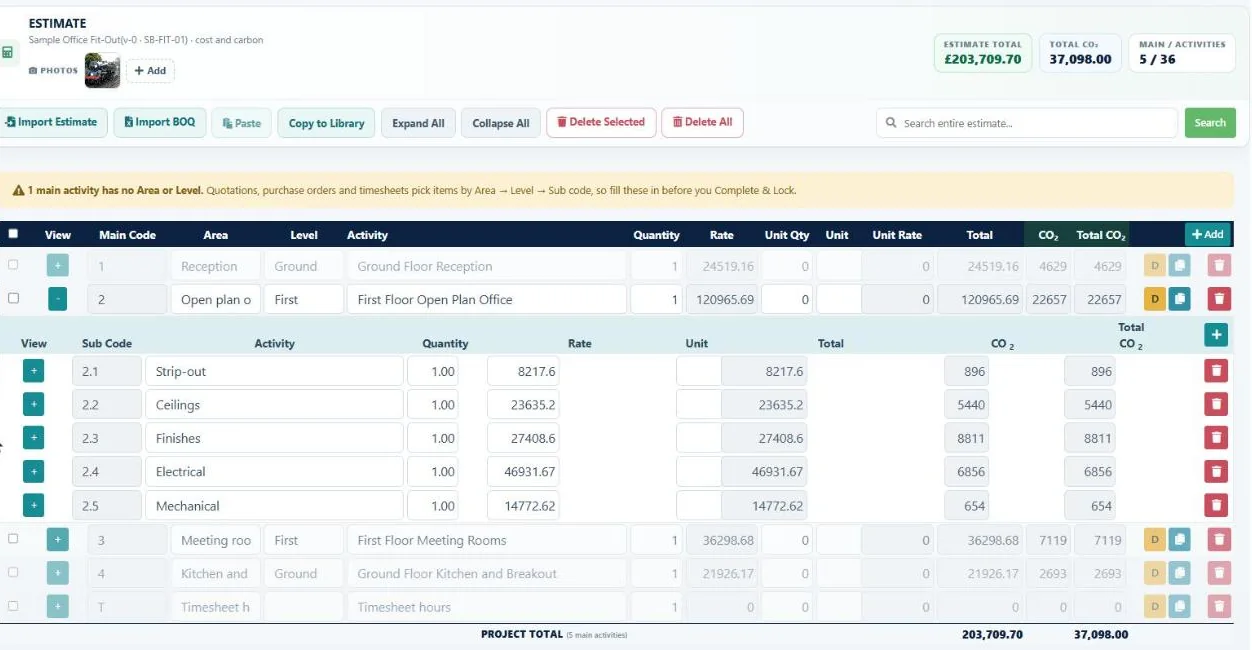
The local I-Cost estimating page documents Excel/CSV BOQ import, libraries, cost and selling rates, and locked estimates with revisions. The platform page describes connections to supplier requests, orders and cost reporting. This website is evidence of documented workflows, not an audit of every application permission or calculation. Verify detailed requirements in a demonstration.
Practical takeaway: run a controlled pilot
- Choose a completed tender with a revision and known final totals.
- Import the BOQ and reconcile quantities, units, cost and selling totals.
- Recreate the revision, discount and qualifications without losing the original issue.
- Ask a buyer to trace an accepted item into the procurement workflow.
- Record review effort, corrections, export quality and training needs before deciding.
Keep a signed-off export and a rollback plan during transition. A successful switch gives the team a clearer, repeatable process; it does not remove the need for an estimator's technical and commercial judgement.
Test the workflow with one representative BOQ
The existing I-Cost estimating page documents Excel and CSV BOQ import, rate libraries, cost and selling rates, locked estimates and revisions. Compare those workflows with your current controls using a completed tender.
Frequently asked questions
Can Excel still be used professionally for construction estimating?
Yes. A controlled workbook with protected calculations, revision management and independent checks can suit straightforward estimating work.
Does estimating software eliminate errors?
No. Incorrect quantities, units, scope assumptions or rates can produce an incorrect estimate in any system. Reconciliation and review remain necessary.
Should contractors move every historical estimate into a new system?
Not necessarily. Start with agreed current libraries and representative live work. Retain readable historical records and import more only where there is a clear benefit.
What should a BOQ software trial prove?
It should demonstrate accurate import, reconciliation, revisions, rate application, quotation output and the handover your buying team actually needs.