 I-COST
- Excel and CSV BOQ import with a total check
- Columns recognised and rows sorted for you to check Smart
- Areas and levels kept from the BOQ
- BIM model (IFC) import Beta
- Revit add-in: quantities straight from Revit Beta
- Cost and selling rates with your margin
- Labour hours costed at your company rate
- Rate libraries and copy to estimate
- Copy between projects, checked against what you last paid Smart
- Locked final estimate with every version kept
Construction cost control software
Keep more of the marginyou already won.
Margin is rarely lost in one big event. It leaks through retyped quantities, guessed prices, late orders, unapproved hours and figures nobody sees until the final account. I-Cost closes those leaks by keeping the whole job in one place.
Everything in I-Cost
Every feature,
in one place.
Everything below comes in one plan, with nothing extra to buy. Pick a role to see what matters most to that person.
- 52features
- 9areas of the job
- 4smart checks
- 1plan, £35 per user
- Quotation PDF built from the estimate
- Discounts and the agreed contract sum
- Quotation summary and preview before sending New
- Supplier list with what each one supplies
- Suggested suppliers for each request Smart
- One quotation request to several suppliers
- Prices side by side, lowest like-for-like shown
- Free supplier portal to price and follow orders
- Suppliers work for several customers from one login
- Supply chain view and supplier job progress New
- Purchase orders from the estimate or the winning quote
- Draft orders, and order from the lowest quotes in one go New
- Item tracker: every material from request to delivery New
- Suppliers accept, process and dispatch in their portal New
- QR delivery labels and delivery notes New
- Goods received against each order line
- Invoices and credit notes against the order
- Received-not-invoiced accruals worked out for you
- Supplier invoices sent to Xero as draft bills, paid dates back (or a file for Xero's import)
- Approved budget from the locked estimate
- Committed cost the moment an order is sent
- Forecast final cost and forecast margin
- Cost types and budget baselines
- Project cost report with drill-down to every record
- Dashboard across all your projects
- Simple Gantt programme with Excel export
- Project dates against today, with late work flagged
- Every project in the same ten steps, design first, with the next step shown
- Site photos on the project
- Log hours from a phone on one screen
- Hours against estimate items
- Weekly timesheets and approvals, with send back
- All logged hours costed into the cost report
- Embodied carbon on every estimate line (UK ICE or your EPD figures)
- Lines matched to carbon factors, with a match strictness you set Smart
- Whole life carbon assessment, stages A1–A5 to D Beta
- Roles and permissions for each person
- Read-only Reviewer access
- Team chat on the project
- Help Desk and Costa, the help assistant
- Installs on phone, tablet and PC, with no app store
- Self-serve billing: add users or cancel any time
Smart checks your work using your own data. New added in the last few months. Beta included and still being improved.
Where margin leaks
Six leaks.
Six fixes.
The same problems come up on almost every job. Here is what changes when the job sits in one place.

Quantities are retyped from the client's BOQ, and a line or a decimal goes missing.
The BOQ is imported, checked against its total and priced in one estimate.
Rates are copied from an old job, a spreadsheet or an AI chatbot, and nobody knows they are out of date.
Prices come from supplier quotes and your own orders, and copied rates are checked against what you last paid.
The client agrees a discount, but the reports still use the original price.
The accepted quotation sets the agreed contract sum used in every report.
Orders go out without anyone comparing them to the budget.
Every order counts against the approved budget the moment it is sent, by area and cost type.
Deliveries arrive short or damaged, and invoices are paid in full anyway.
Site confirms what arrived; goods received, invoices and credit notes sit on the order.
Labour hours reach the office weeks late, so overspend is found too late.
Hours are logged on a phone, approved and costed into the report the same week.
Why guessing costs so much
AI can draft an estimate.
It can't price your job.
AI tools are useful for drafting, but they don't know today's prices from your suppliers. Real prices come from your suppliers' quotes and your own orders, and with margins this thin, one wrong guess can cost the whole profit.
- 2.4%
Average pre-tax margin of the UK's top 100 contractors.
The Construction Index, Top 100, 2025 - 6.4%
Rise in UK construction material prices in one year. Structural steel rose 21.2%, rebar 12.5%.
Department for Business and Trade, August 2026 - 21%
Of project value lost to avoidable errors, up to £25bn a year in the UK. Inadequate planning is the biggest cause.
Get It Right Initiative / CITB, 2026
In a 2024 university study on a real bridge job, GPT-4's estimates were “inaccurate, inconsistent, and not relevant” until the researchers gave it real labour, plant and material rates. Even then, item costs varied between runs of the same question. Ghasemi & Dai, Smart Construction, 2024
Construction teams spend about 5.5 hours a week looking for project information, and poor communication and poor project information cause nearly half of rework. FMI / PlanGrid survey of 600 US professionals, 2018
Your number
A small percentage
is a large number.
Put in your yearly turnover and the share of margin you think is leaking today. This is a simple illustration, not a promised saving.
£100,000
a year of margin worth protecting
Illustrative only: turnover × percentage. Not a guaranteed saving.What changes
Less retyping, fewer surprises,
nothing lost.
Time back
No retyping BOQs, chasing quotes by email or rebuilding cost reports at month end.
BOQ and BIM import · quotation requests · live reports
Fewer errors
Totals checked on import, out-of-date rates flagged, budgets locked and every version kept.
BOQ total check · price check on copies · approved budget versions
Nothing lost
Quotes, orders, deliveries, invoices, documents and conversations all sit on the project.
Item tracker · documents · team chat · hourly backups
Earlier decisions
Committed cost and forecast margin update as orders, invoices and hours come in.
Forecast final cost · cost to complete · records behind every figure
Better buying
Several suppliers asked at once, prices compared side by side, and the lowest quote ordered in one click.
Suggested suppliers · free supplier portal · price comparison
Carbon ready for tenders
Carbon figures come from the same quantities as the cost, without a separate model.
Embodied carbon per line · whole life carbon (beta)
See it early
The forecast margin, before the final account.
The project cost report brings the agreed contract sum, the approved budget, committed and incurred cost, the forecast final cost and the forecast margin together, by area and by cost type. When something moves, you see it the same week and can open the orders, invoices and hours behind it.
How cost control works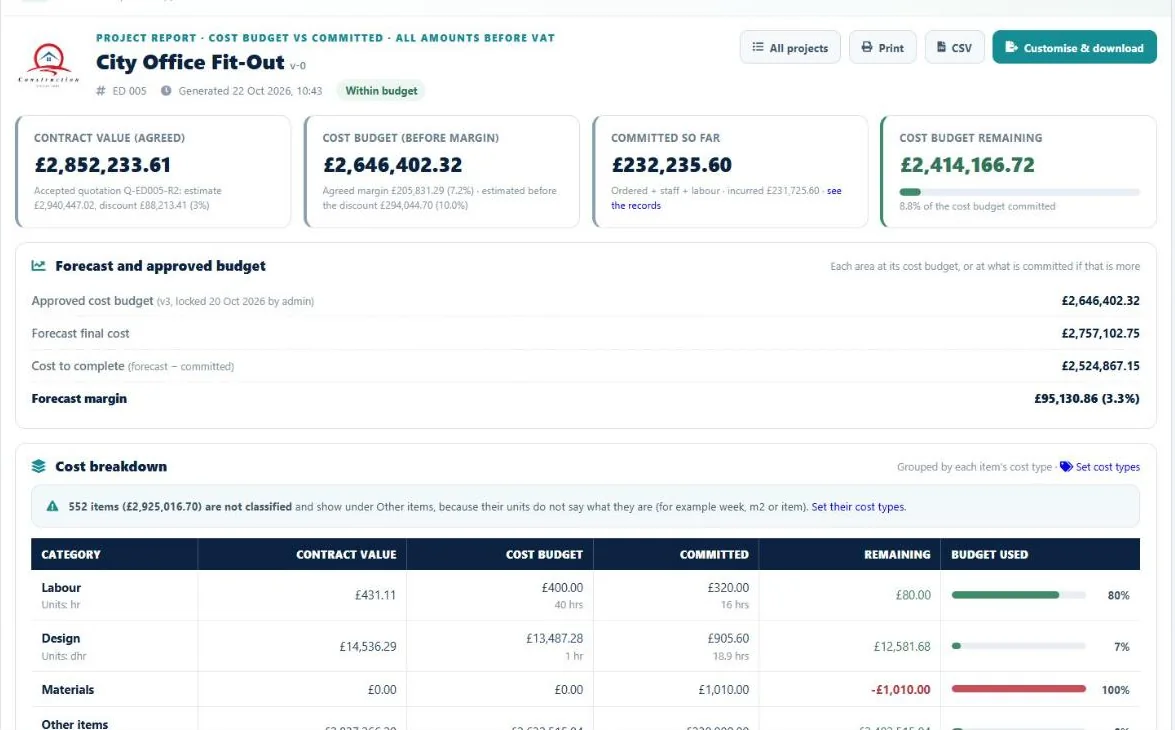
How does I-Cost protect margin?
By keeping the agreed contract sum, the approved budget, supplier quotes, orders, invoices, deliveries and site hours in one place, so the forecast margin is always up to date and problems show up while there is still time to act.
Can an AI chatbot price our job instead?
An AI chatbot can help draft an estimate, but it does not know today's prices from your suppliers. A 2024 university study found GPT-4's estimates were inaccurate and inconsistent until it was given real labour, plant and material rates. I-Cost keeps those real rates: your supplier quotes and your own purchase order prices.
Does I-Cost guarantee a saving?
No software can guarantee a saving. I-Cost gives you the figures early enough to act on them: what has been committed against the budget, what the forecast margin is, and which items are still waiting for prices or deliveries.
What does it cost?
£35 per user per month after a 7-day free trial, with no bank card needed to start. Suppliers using the portal do not pay. See pricing
How is I-Cost better than a construction cost tracking spreadsheet?
A spreadsheet only knows what someone typed into it. In I-Cost, orders, invoices, deliveries and site hours update the committed cost and the forecast margin as they happen, every figure links to the records behind it, and nothing is copied between files.