 I-COST
Construction timesheet app
A construction timesheet appyour site team will actually use.
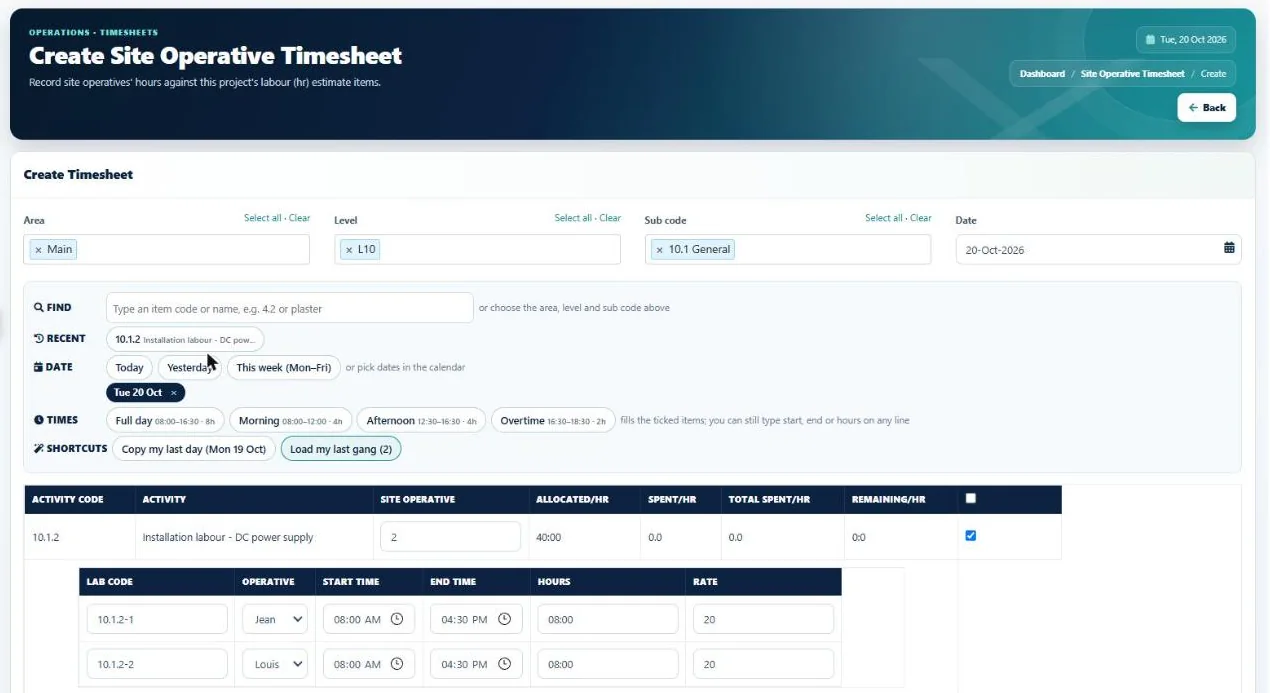
Site teams log their hours on a phone in a few taps, supervisors log a whole gang at once, managers approve the week, and the labour cost lands in the project report the same week.
The problem
Paper timesheets
cost more than paper.
When hours arrive late and on paper, labour overspend is found weeks after it happened.

Paper sheets arrive at the end of the week, or later.
Hours are logged on the day, on a phone.
Filling in a timesheet takes too long on site.
Tap the item, tap Full day or Morning, save.
A supervisor writes up the whole gang by hand.
The gang from last time is ticked already; one tap sets everyone's hours.
Hours are booked to the wrong job or item.
Only the project's labour items are offered, recent ones first.
Approving means chasing paper.
Approve a person's week in one click, or send it back with a note.
Labour cost is a guess until month end.
Hours are costed at your rates in the report as they are logged.
In I-Cost
On site in seconds.
In the report the same week.
On a phone, "Log my hours" opens one simple screen: the project, today or yesterday, your items as large buttons and a running total. Supervisors log their gang. Approvers see each person's week, with long days and weekend work flagged, and approved hours are locked. Every hour is costed at your rates in the project report.
- One-screen phone timesheet
- Quick time buttons
- Recent items first
- Site gangs in one go
- Design tasks on design hours
- Photos from the camera
- Weekly approvals with send back
- Costed at your hourly rates

Step by step
How timesheets work
in I-Cost.
Log
Open "Log my hours" on a phone and tap the item and the time.
Gangs
Supervisors log the gang's hours in one go and adjust anyone who differs.
Approve
Approvers approve a week in one click, or send it back with a note.
Cost
Hours are costed into the project report, with approved hours shown and locked.
Does the timesheet app work offline?
No. I-Cost needs a mobile or Wi-Fi connection to save hours, so they reach the office straight away.
Do I need to download an app?
No app store needed. Open I-Cost in the phone's browser and add it to the home screen; it then opens like an app, with a "Log my hours" shortcut.
Who can approve timesheets?
Company admins approve everything; project managers, project leads, site managers and supervisors approve on the projects they are on. Nobody can approve their own hours.
Can a supervisor log hours for the whole gang?
Yes. The people from the supervisor's last timesheet are ticked already, one tap sets everyone's hours, and each person's hours can still be changed.
More of I-Cost
One platform for the whole job.
Everything below works together, from the same estimate. See the full platform.