 I-COST
How I-Cost works
Up and runningon day one.
Sign up, bring in the client's BOQ, invite your team and send your first quotation request, with a guided tutorial showing you each step on the real screens. Then every project runs through the same ten clear steps.
Getting started
Five steps to your
first supplier prices.

Start the free trial
Sign up with your work email for 7 days of the full platform. No bank card needed.
Add your team
Invite colleagues by email and give each a role. They choose their own password.
Create a project
Add the client, dates and margin, and give the right people access. Or keep the demo project to explore.
Import the BOQ
Upload the client's Excel or CSV BOQ, or an IFC model (beta), check the total and save it to the estimate.
Ask suppliers for prices
Pick items from the estimate and send one request to several suppliers. They reply in the free portal.
Every project
How to manage a construction project,
step by step.
The same ten steps, in the order a job runs, sit across the top of your dashboard, and the Workflow page shows where each project stands and what to do next. Suppliers price the materials while you estimate; site progress and labour run together.
Project
Client, dates, team
Set up the job, say whether the design is ready and give your team access.
Design
Design sign-off
Design not ready? Price the design work in the estimate first and the client or architect signs each design line off; then the materials open. Already designed? Go straight to the estimate.
Estimate
BOQ, pricing, carbon
Import the BOQ or BIM model and price every item at cost and selling rates, with carbon on each line.
Supplier prices
RFQs, replies
While you estimate, suppliers price the materials in their own portal, and you compare the replies side by side.
Client quote
Quote, acceptance
Send the client a quotation and record the price they accept as the contract sum.
Budget
Lock the budget
The agreed estimate is locked as the budget everything is measured against.
Orders
Purchase orders
Order from the best supplier prices, against the estimate.
Deliveries
Deliveries, invoices
Record what arrives, then the supplier invoices and payments, into Xero if it is connected.
Site work
Programme, labour
Dates and progress for each area with late work flagged, and staff and site hours logged, approved and costed.
Report
Cost, margin
Committed cost, forecast final cost, margin and carbon, ready to share.
Your dashboard
Always know what to do next.
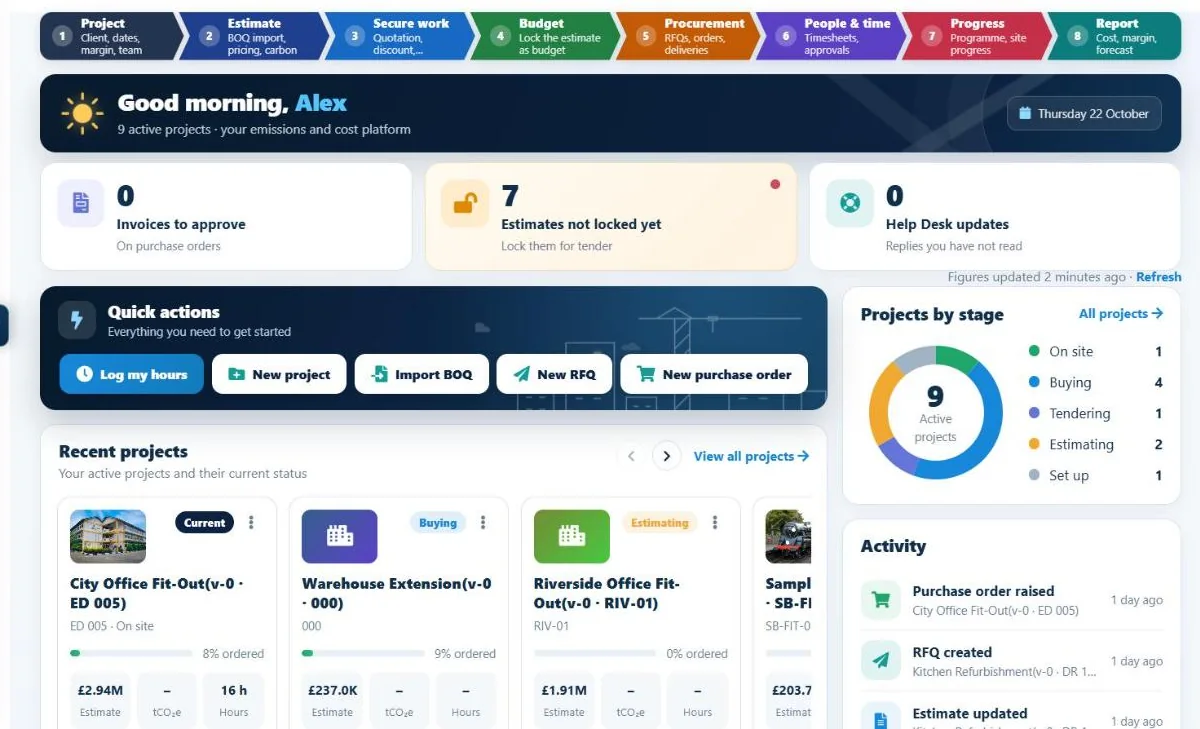
The dashboard opens on the ten steps, what is waiting for you (timesheets to approve, supplier replies, invoices, estimates still to lock), quick actions, your recent projects and the latest activity across the company.
- The ten steps, one click each
- What is waiting for you
- Quick actions
- Recent projects and activity
Help when you need it
You're never on your own.
Guided tutorial
Step-by-step chapters that highlight the real buttons: add your team, create a project, import a BOQ, raise an order and more.
Costa, the help assistant
Ask Costa how to do something in I-Cost and get an answer straight away, inside the app.
Help Desk
Raise a question or a problem with the I-Cost team, add a screenshot, and get an alert when they reply.
Demo project
A ready-made project to explore safely before you put your own work in. Keep it or remove it.
Team chat
Talk about the job inside I-Cost, with unread badges, instead of in scattered emails.
Guided start
Prefer someone to walk you through it? Book a demo or a commercial health check on one live project.
On site and in the office
Install it like an app.
I-Cost runs in the browser and installs on phone, tablet and PC, with no app store and nothing to download. It is always the same live system.
iPhone and iPad
Open I-Cost in Safari, tap Share, then Add to Home Screen.
Android
Open I-Cost in Chrome, tap the menu, then Install app or Add to Home screen. Press and hold the icon for "Log my hours".
PC and Mac
Open I-Cost in Chrome or Edge and click the install icon in the address bar. It opens in its own window.
Your data
Safe, separate and yours.
Each company's data is kept separate, people only see the projects they are given, and roles control what each person can change. Everything is backed up off-site every hour, with a standby server ready, and you can download all your company's data at any time.
- Roles and per-person permissions
- Read-only Reviewer access
- Hourly off-site backups
- Standby server ready to take over
- Download your data at any time (UK GDPR)
- Billing managed by you, cancel any time
Do we need training?
Most people start with the guided tutorial inside I-Cost, which walks through each step on the real buttons, and the demo project you can keep or remove. Costa, the in-app help assistant, answers questions, and the Help Desk reaches the I-Cost team.
Can we try it on a live project?
Yes. The 7-day free trial is the full platform, so you can import a real BOQ and invite suppliers. If you would rather start with a guided commercial health check or a pilot on one project, book a demo.
What happens after the trial?
You subscribe by card at £35 per user per month. Billing is managed in the app through Stripe, where you can change your card, download invoices or cancel; a cancelled subscription stops at the end of the month already paid for.
Is our data safe?
Each company's data is kept separate, people only see the projects they are given, and data is backed up off-site every hour with a standby server ready. You can download all your company's data at any time.
How do I manage a construction project in I-Cost, step by step?
Set up the project with its client, dates, margin and team; import the BOQ and price the estimate; send the client quotation and record the agreed sum; lock the estimate as the budget; ask suppliers for prices and raise purchase orders; log and approve hours; date the programme and track progress; then report on cost, forecast margin and carbon.