Construction estimating & cost control software for UK contractorsYou won the marginNow protect it.

Most contractors only find out what a job really made at the final account. I-Cost lets you manage your construction projects in one place, from the client's BOQ to supplier quotes, purchase orders, site hours and carbon, and shows your forecast margin from day one, while there is still time to act.

7-DAY FREE TRIAL · NO BANK CARD REQUIRED · £35 / USER / MONTH · WORKS ON PHONE, TABLET AND PC

I-Cost / Import a client BOQ
Real I-Cost interface · Demonstration project data

FROM ESTIMATE TO DELIVERY

  1. IMPORT BOQ OR BIM MODEL
  2. BUILD ESTIMATE
  3. QUOTE THE CLIENT
  4. REQUEST SUPPLIER PRICES
  5. ORDER
  6. TRACK HOURS & DELIVERIES
  7. CALCULATE CARBON
  8. REPORT

Built for UK contractors & commercial teams

Most margin is not lost at tender.
It leaks during delivery.

Six problems we hear from contractors every week, and what changes when the whole job sits in one place.

  • The client's BOQ is retyped into spreadsheets, line by line.

    Import the Excel BOQ, or the quantities from a BIM model, straight into the estimate.

  • Prices are guessed from an old job, a spreadsheet or an AI chatbot.

    Price from real supplier quotes and your own orders. Copied estimates are checked against what you last paid.

  • Supplier quotes sit in inboxes and get compared by hand.

    Send one request to several suppliers, see the prices side by side and order from the best in one click.

  • Nobody sees committed cost against budget until it is too late.

    Budget, committed, spent and forecast final margin, live on every project.

  • Site hours and deliveries arrive on paper, days late.

    Hours logged on a phone and approved. Goods received and QR delivery notes against each order.

  • Tenders now ask for carbon figures, and consultants are expensive.

    Embodied carbon from the same estimate, and whole life carbon assessments (beta).

Why guessing costs so much

AI can draft an estimate.
It can't price your job.

Real prices come from your suppliers and your own orders. With margins this thin, one wrong guess can cost the whole profit.

In a 2024 university study, GPT-4's estimates were “inaccurate, inconsistent, and not relevant” until the researchers gave it real labour, plant and material rates. Ghasemi & Dai, Smart Construction, 2024

On a £1m job at a 3% margin, material rates 5% too low on £600,000 of materials cost £30,000: the whole profit. Illustrative example.

See it working

I-Cost in two minutes

Watch a client BOQ become a priced estimate, supplier quotes, purchase orders and a live cost report, all in one place.

Plays from YouTube when you press play. Nothing loads from YouTube before that.

I-Cost / Product tour
Watch on YouTube

Who it's for

One job. Eight people.
Each with their own worry.

A buying decision involves the whole team. Here is what changes for each of them.

  • Managing & commercial directors

    See every project's forecast margin now, not at the final account.

  • Quantity surveyors

    Budget, committed and cost to complete without rebuilding spreadsheets.

  • Estimators

    Import the BOQ, price it from real rates and send the client quotation the same day.

  • Buyers

    Quotes from several suppliers side by side, suggested suppliers and one-click orders.

  • Project & site managers

    Log hours and deliveries on a phone, and see the programme and what is running late.

  • Sustainability leads

    Carbon figures for tenders and planning from the same quantities as the cost.

  • Finance

    Goods received, accruals, invoices against orders and credit notes, all in one place.

  • Suppliers & subcontractors

    A free portal to price requests and follow orders, with no email chasing.

See what changes for each role

The platform in practice

One commercial story.
Four connected views.

Disconnected spreadsheets leave teams piecing the story together. I-Cost connects the baseline, commitments and delivery records in one commercial workflow.

01 / Cost visibility

Spot margin slipping while you can still fix it

Compare the estimate, committed value and forecast final cost across active projects.

  • Portfolio-level cost tracking
  • Committed against budget
  • Forecast margin movement
Explore the platform
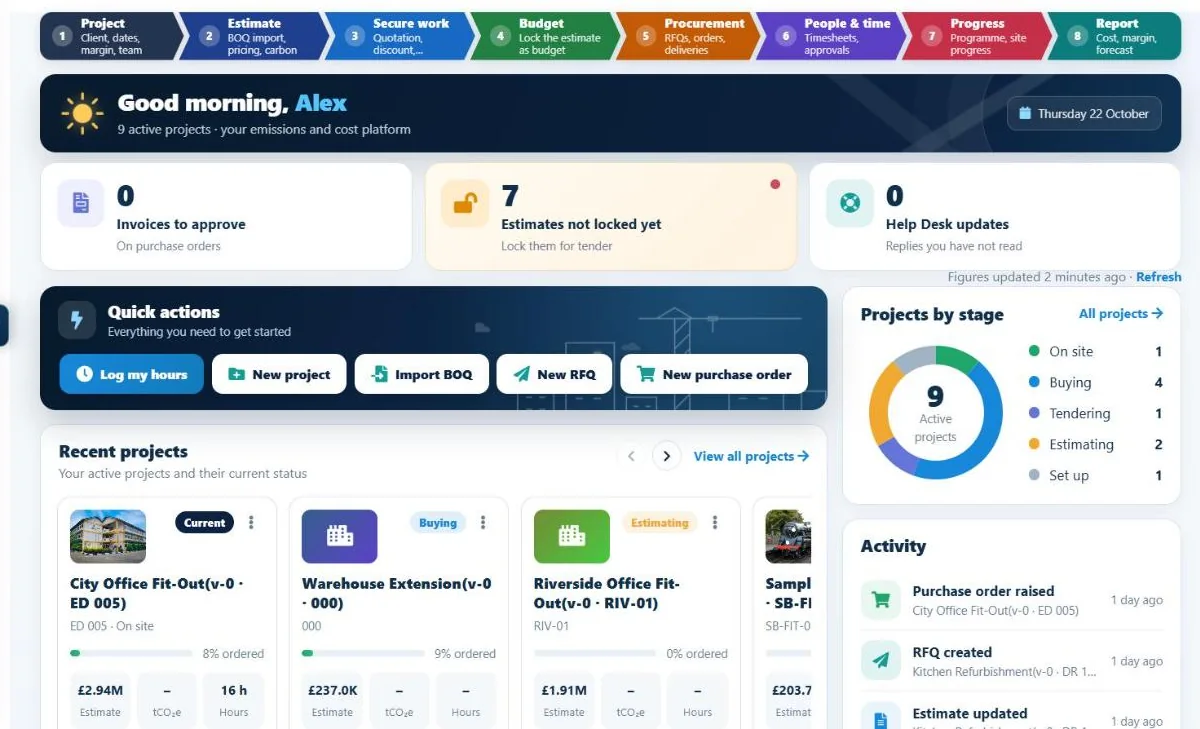
I-Cost dashboard showing the eight project steps, what is waiting for you and projects by stage
Dashboard · Demonstration project data

02 / Connected delivery

Know what to do next on every project

Follow project setup, estimating, procurement, timesheets, carbon and reporting through a visible lifecycle.

  • Clear steps and owners
  • What is waiting for you
  • Structured completion
Explore the platform
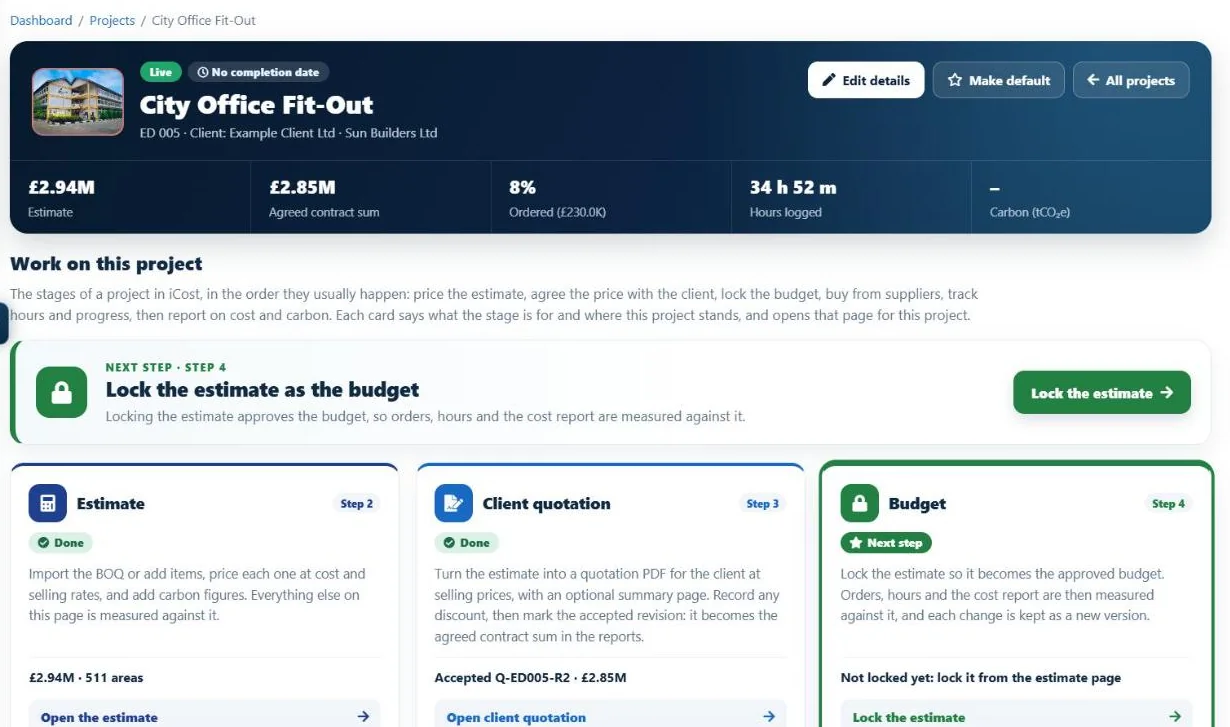
I-Cost project page with the estimate, client quotation, budget, supplier quotes, orders, timesheets and programme as numbered steps
Project page · Demonstration project data

03 / The commercial baseline

Start from a baseline you trust

Build detailed cost and carbon estimates that stay connected to procurement and delivery.

  • Structured estimate build-up
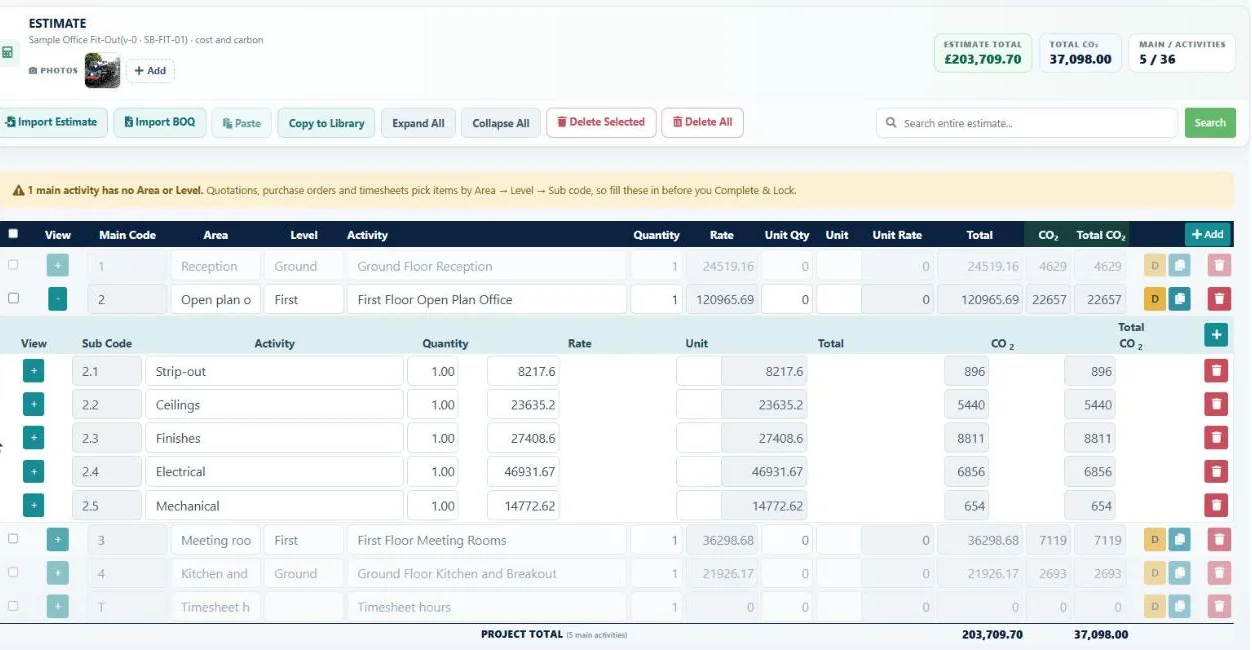
  • Cost and carbon together
  • Reusable project libraries
Explore the platform
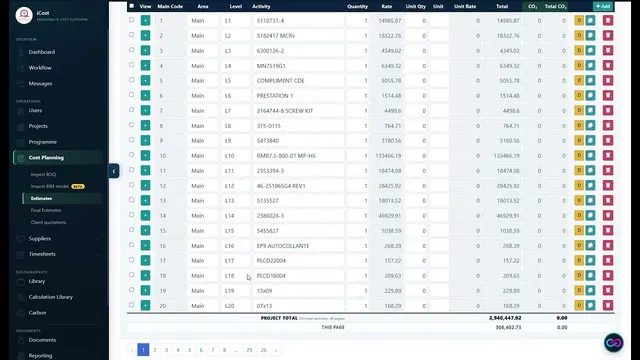
I-Cost estimate with cost rates, totals and carbon on every line
Cost and carbon estimate · Demonstration project data

04 / Site to commercial team

Get site costs in the same day

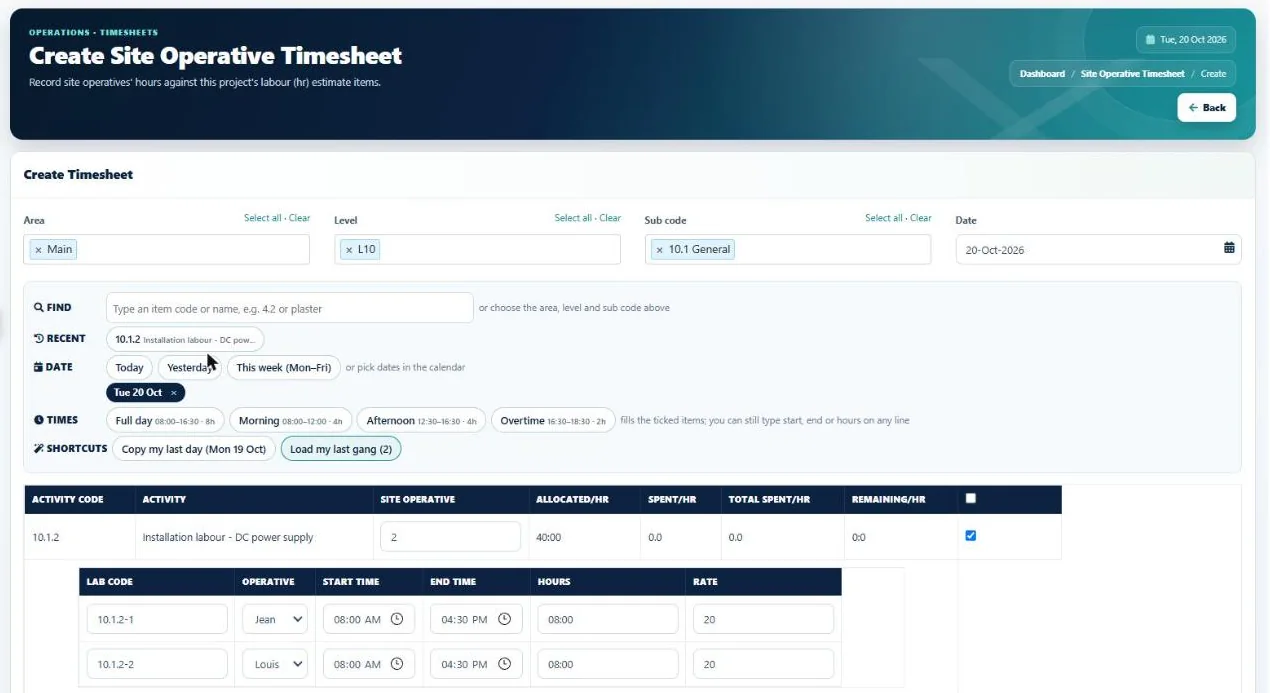
Link daily activity, records and working hours back to the commercial picture.

  • Hours logged on a phone
  • Site records and photos
  • Approvals before costs count
Explore the platform
I-Cost site operative timesheet with quick time buttons and hours against estimate items
Site timesheet · Demonstration project data

Everything in one place

One platform for commercial control.

Every stage of a job, from the client's BOQ to the final report, connected so nothing is retyped, lost or guessed.

01 / Estimate

Estimating, BOQ & takeoff

Stop retyping the client's BOQ.

  • Excel / CSV BOQ import with total check
  • BIM model import (IFC) Beta
  • Cost and selling rates with margin
  • Libraries and copy to estimate
  • Price check on copied estimates
  • Locked final estimate and revisions
02 / Quote

Client quotations

Send a clear quotation and keep the agreed figure.

  • Quotation PDF from the estimate
  • Negotiated discount with a reason
  • Agreed contract sum in every report
  • Revisions and status
03 / Source

Supplier management

Get real prices, not guesses.

  • Quotation requests to several suppliers
  • Suggested suppliers for the items
  • Free supplier portal
  • Side-by-side price comparison
  • Order from the lowest quote
04 / Order

Purchase order system

Know what is ordered, delivered and invoiced.

  • Drafts, revisions and printed orders
  • Goods received and accruals
  • Credit notes and closing orders
  • QR delivery notes
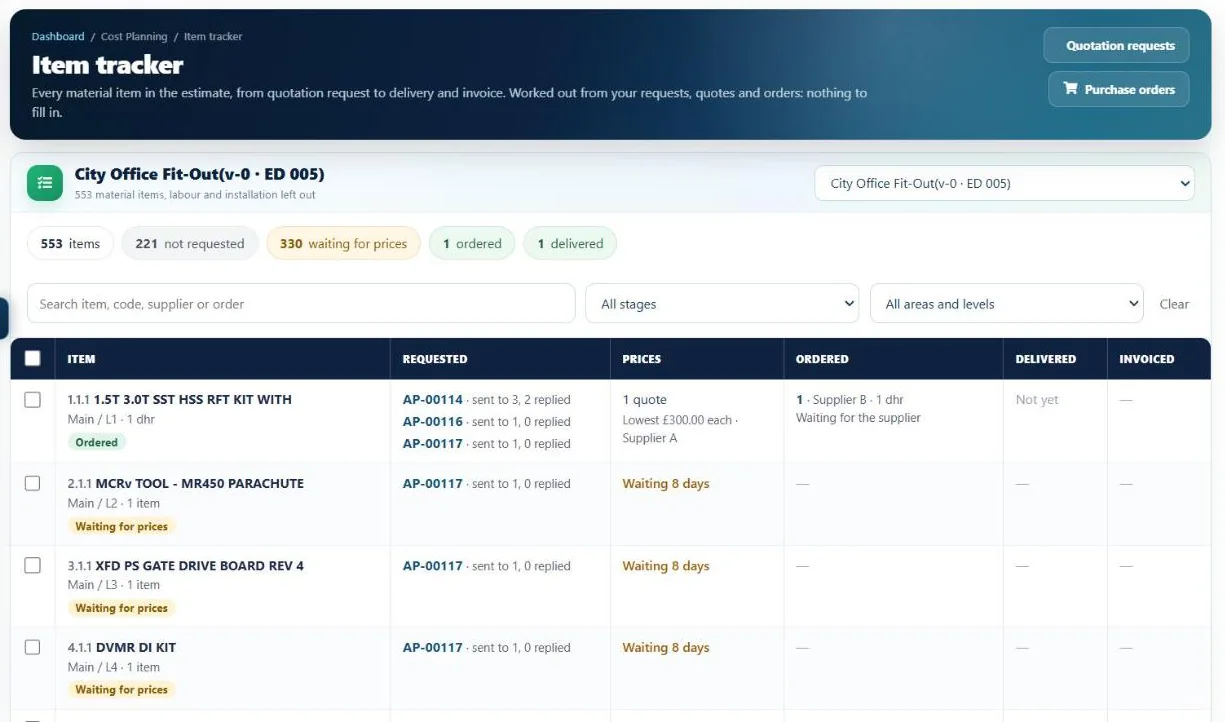
  • Item tracker, from request to invoice
  • Supply chain view
05 / Control

Cost & budget tracking

See the margin while you can still change it.

  • Approved cost budget
  • Committed, spent and forecast final cost
  • Forecast margin
  • The records behind every figure
  • PDF, Word, Excel and CSV reports
06 / Plan

Construction programme

See what is late before it costs money.

  • Gantt programme built from the estimate
  • Late items and what is coming up
  • Excel download
  • Dashboard of what is waiting for you
07 / Track

Timesheets

Real labour cost, not paper sheets.

  • Log hours on a phone
  • Site gangs and design tasks
  • Approvals with send back
  • Approved hours locked
  • Costed at hourly rates
08 / Carbon

Carbon

Carbon figures from the quantities you already have.

  • Embodied carbon per estimate line
  • UK ICE and your own EPD factors
  • Whole life carbon assessment, A1–A5 to D Beta
  • Smart material matching
  • Carbon dashboard and reports
See every feature

A clearer commercial position

Know the commercial position before the final account.

I-Cost brings estimates, commitments, forecast movement and delivery data together so commercial teams can act earlier.

Estimated Cost

The baseline against which delivery is measured.

Committed Value

The cost already committed to suppliers and packages.

Forecast Final Cost

The expected cost position as the project develops.

Margin Exposure

Cost movement and risks that need commercial attention.

I-Cost / Project cost tracking
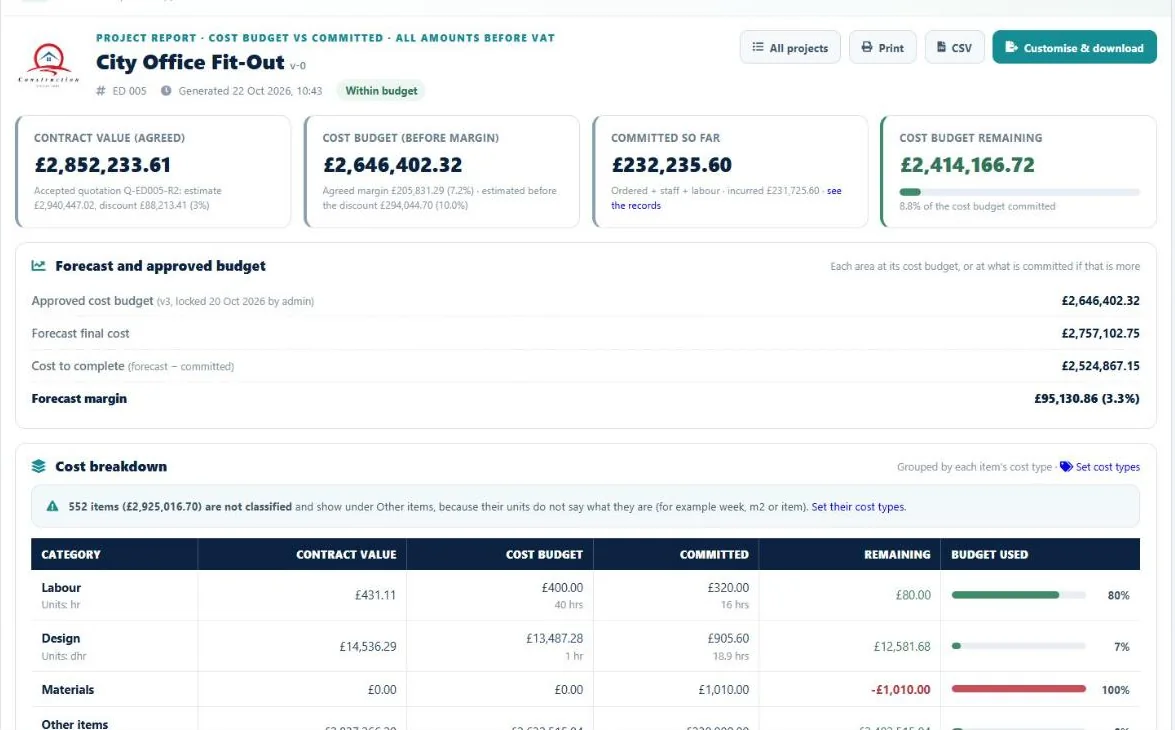
I-Cost project cost report with contract value, cost budget, committed cost, forecast final cost and forecast margin
Real product interface. Figures shown are demonstration data.

Reporting

Reports in a few clicks,
straight from live data.

No copying figures into spreadsheets at month end. Every report is built from the project as it stands today, and every figure opens the records behind it.

  • Project cost report

    Contract value, cost budget, committed, spent, forecast final cost and forecast margin, by area and by cost type.

  • Board and client documents

    Show or hide sections, write your own introduction, add your company logo and download the project report as Word or PDF.

  • Purchasing report

    Every order with what is received, invoiced and still to invoice, plus accruals.

  • Timesheet reports

    Staff and site labour hours by project, week and person, with approved hours shown.

  • Carbon reports

    Embodied carbon by estimate line and material, and whole life carbon results by life-cycle stage Beta

  • Programme summary

    What is late, what is coming up and progress across projects, with an Excel download.

  • Client quotation

    A quotation PDF with a summary page, your terms and an acceptance box, ready to send.

  • The figures behind the figures

    Click any total to see the orders, invoices and timesheets that make it up.

  • PDF
  • WORD
  • CSV / EXCEL
  • PRINT

Commercial and sustainability teams, connected

COST AND CARBON IN THE SAME ESTIMATE

Every estimate line can carry both a financial rate and an embodied-carbon factor, so commercial and sustainability teams work from the same quantities. When a tender or planning condition asks for more, whole life carbon assessments (beta) cover stages A1–A5 through to D, following the RICS Professional Standard (2nd edition) and BS EN 15978.

Cost Rate
£100.00 / unit
Margin
20%
Selling Rate
£125.00 / unit
kgCO2e
15 / unit

Illustrative values only. Margin is calculated as a percentage of the selling rate; carbon uses the selected factor.

On site and in the office

Works on phone, tablet and PC.

I-Cost runs in the browser and installs like an app, with no app store and nothing to download. Site teams log hours and check deliveries from their phone. The office sees the same live figures.

  • Phone & tablet

    Add I-Cost to the home screen. A “Log my hours” shortcut opens a one-screen timesheet.

  • PC & Mac

    Install from Chrome or Edge and I-Cost opens in its own window, like any desktop app.

  • One live system

    No separate mobile version and no syncing: everyone works from the same project data.

Team, access and support

Built for construction teams.

Give each person the access they need, keep every conversation on the project, and get help inside the app.

Access and security

  • Roles and permissions for each person
  • Read-only Reviewer for directors, client QSs and auditors
  • Invite your team by email
  • Hourly off-site backups and a standby server
  • Download your company data at any time (UK GDPR)

Help and messages

  • Team chat with unread badges
  • Costa, the in-app help assistant
  • Guided tutorial with step-by-step chapters
  • Help Desk to raise a question with the I-Cost team

Questions

Frequently asked questions

Something else? Ask us.

What is I-Cost?

I-Cost is construction estimating, procurement, cost control and carbon software for UK contractors. The client's BOQ, your estimate, supplier quotes, purchase orders, site hours, programme and reports sit in one place, so you can see the forecast margin on every project.

Who is I-Cost for?

UK main contractors and specialist subcontractors: commercial directors, quantity surveyors, estimators, buyers, project and site managers, sustainability leads and finance teams. Suppliers use the supplier portal free of charge.

Can I import my client's Excel BOQ?

Yes. Upload the Excel or CSV bill of quantities, tell I-Cost what each column is, check the preview and the total, and bring the lines straight into your estimate. Nobody has to retype it.

Can I import a BIM model?

Yes, in beta. Choose an IFC file exported from Revit, ArchiCAD, Tekla or a similar program. I-Cost adds up the quantities in your browser and shows them in the same preview as a BOQ import. The model itself is not uploaded to our server.

Can't I just ask an AI chatbot for prices?

An AI chatbot can help draft an estimate, but it does not know today's prices from your suppliers, and material prices move every month. Research has found AI estimates unreliable until they are given real rates. I-Cost keeps your supplier quotes and your own purchase order prices in one place, and checks copied estimates against what you last paid.

Does I-Cost work out embodied carbon?

Yes. Each estimate line can carry a carbon factor, from UK ICE data or your own EPD figures. Whole life carbon assessments (beta) cover life-cycle stages A1 to A5 through to D, following the RICS Professional Standard (2nd edition) and BS EN 15978.

Can I use I-Cost on my phone?

Yes. I-Cost runs in the browser and installs like an app on phone, tablet and PC, with no app store. Site teams log their hours from their phone with a Log my hours shortcut.

Do suppliers have to pay?

No. Suppliers get a free portal where they receive your quotation requests, send prices and follow your orders.

How much does I-Cost cost?

£35 per user per month after a 7-day free trial. No bank card is needed to start the trial. See pricing

Can I manage my whole construction project in I-Cost?

You can run the commercial side of a construction project in one place: the client's BOQ and estimate, the client quotation, supplier quotes, purchase orders and deliveries, site hours, the programme, and cost and carbon reports. I-Cost does not replace drawing management, RFI or snagging tools.

Is I-Cost suitable for small construction businesses?

Yes. You pay £35 per user per month with no set-up fee, so a team of two costs £70 a month, and you can start with a 7-day free trial on one live project. Suppliers use the portal free.

How is I-Cost better than a construction cost tracking spreadsheet?

A spreadsheet only knows what someone typed into it. In I-Cost, orders, invoices, deliveries and site hours update the committed cost and the forecast margin as they happen, every figure links to the records behind it, and nothing is copied between files.

Try I-Cost

SEE YOUR OWN PROJECTS, COSTS AND CARBON IN I‑COST.

Start with 7 days of full platform access. No bank card required.

  • 7 days of full platform access
  • Estimating, procurement, labour and carbon
  • Import your own BOQ or use the demo project
  • No bank card required

£35 per user / month after trial. View pricing

Protect the margin you already won.

Show us one live project.

We will help identify the commercial controls, information gaps and recovery opportunities worth addressing first.

  • Try it yourself

    Seven days of the full platform with your own BOQ and suppliers. No bank card needed.

    START FREE TRIAL
  • Request a quote

    For your team size, a 12 or 24 month term, help importing your existing data, or training.

    REQUEST A QUOTE
  • Book a demo or health check

    A walkthrough on your own project, or a commercial health check of where margin is moving.

    BOOK A DEMO