 I-COST
Construction cost & budget tracking
Construction cost trackingthat updates itself.
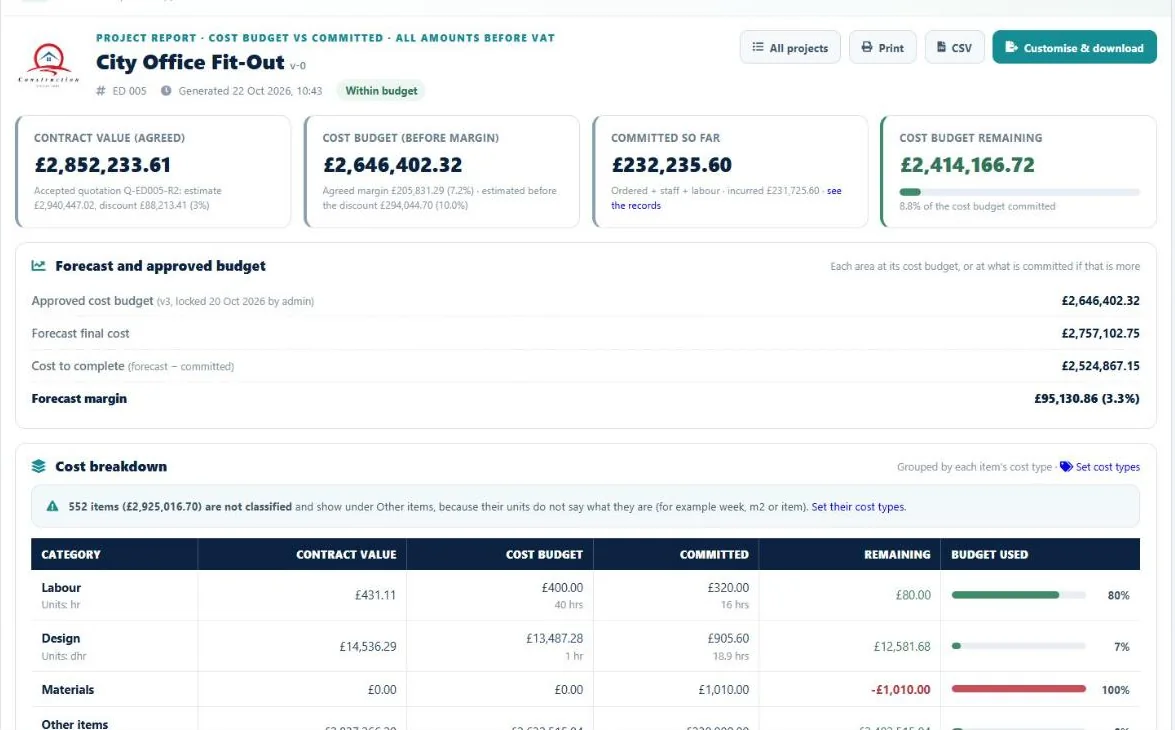
Stop rebuilding the cost tracker every month. In I-Cost, orders, invoices, deliveries and site hours update the committed cost and the forecast margin as they happen, against the budget you locked.
The problem
The tracker is always
a month behind.
Most construction cost tracking still happens in a spreadsheet that someone updates by hand, so overspends are found when it is too late to fix them.

The budget sheet and the estimate say different things.
The estimate is locked as the approved budget, with every version kept.
Committed cost is pieced together from orders and invoices at month end.
Committed cost updates as orders, invoices, staff hours and labour come in.
The agreed discount never reaches the cost report.
The accepted client quotation sets the contract value used in every report.
Nobody knows the forecast margin.
Forecast final cost, cost to complete and forecast margin, in pounds and per cent.
A figure looks wrong and nobody can say why.
Click any figure to see the orders, invoices and timesheets behind it.
Reports for the board take a day to build.
Download the project report as Word, PDF or CSV.
In I-Cost
Budget, committed,
forecast. Live.
Lock the estimate and it becomes the approved cost budget. I-Cost then tracks committed cost (orders or invoices, whichever is higher, plus staff and site labour), what has been incurred, and the forecast final cost and margin, by area and by cost type.
- Approved cost budget, versioned
- Committed and incurred cost
- Forecast final cost and margin
- Cost to complete
- By area and cost type
- Goods received and accruals
- The records behind every figure
- Word, PDF and CSV reports

Step by step
How the forecast margin
is worked out.
Contract value
The agreed sum from the accepted client quotation.
Approved budget
The estimate at cost, locked as the budget, by area.
Committed
For each order, the order value or its invoices, whichever is higher, plus staff and site labour hours at their rates.
Forecast
Each area at its budget, or at what is committed if that is more.
Margin
Contract value minus forecast final cost, in pounds and per cent.
Spreadsheet or I-Cost
Cost tracking spreadsheet
vs I-Cost.
| Spreadsheet | I-Cost | |
|---|---|---|
| Updated | When someone has time | As orders, invoices and hours come in |
| Committed cost | Pieced together by hand | From sent orders, invoices, staff and labour |
| Forecast margin | Rarely calculated | Always shown, in pounds and per cent |
| Checking a figure | Search through files | Click it to see the records behind it |
| Versions | Overwritten | Every approved budget kept |
How is committed cost calculated?
For each sent purchase order, the order value or its invoices, whichever is higher, plus staff hours at their cost rates and site labour at the operatives' rates, with approved hours shown alongside. A closed order counts only what was invoiced.
Can I export cost reports to Excel?
Yes. Reports download as CSV for Excel, and the project report can also be customised and downloaded as a Word or PDF document with your logo.
Are figures shown before VAT?
Yes. The project cost report shows all amounts before VAT.
How is I-Cost better than a construction cost tracking spreadsheet?
A spreadsheet only knows what someone typed into it. In I-Cost, orders, invoices, deliveries and site hours update the committed cost and forecast margin as they happen, and every figure links to the records behind it.
More of I-Cost
One platform for the whole job.
Everything below works together, from the same estimate. See the full platform.