 I-COST
Construction project management software
Manage your construction projectsfrom estimate to final report.
Most project tools track tasks and drawings. I-Cost manages what decides whether a job makes money: the estimate, the price the client agreed, the budget, suppliers and orders, site hours, the programme and the forecast margin, all in one place.
The problem
Five tools, five versions
of the same job.
On most jobs the estimate lives in a spreadsheet, quotes in email, orders in Word, hours on paper and the programme in another app. Nobody sees the whole picture until the final account.

The estimate is in one spreadsheet, the budget in another, and they drift apart.
The estimate is locked as the approved budget, and every version is kept.
Supplier quotes, orders and deliveries are spread across inboxes.
Requests, quotes, orders and deliveries sit on the project, item by item.
Site hours arrive on paper at the end of the week.
Hours are logged on a phone, approved and costed into the report.
Nobody knows the forecast margin until the job is finished.
Committed cost and forecast margin update as orders, invoices and hours come in.
The programme is in a separate tool nobody updates.
Dates and progress sit next to the estimate, with late work flagged.
New starters don't know where anything is.
Every project follows the same eight steps, and the project page shows what to do next.
In I-Cost
One project page.
Eight clear steps.
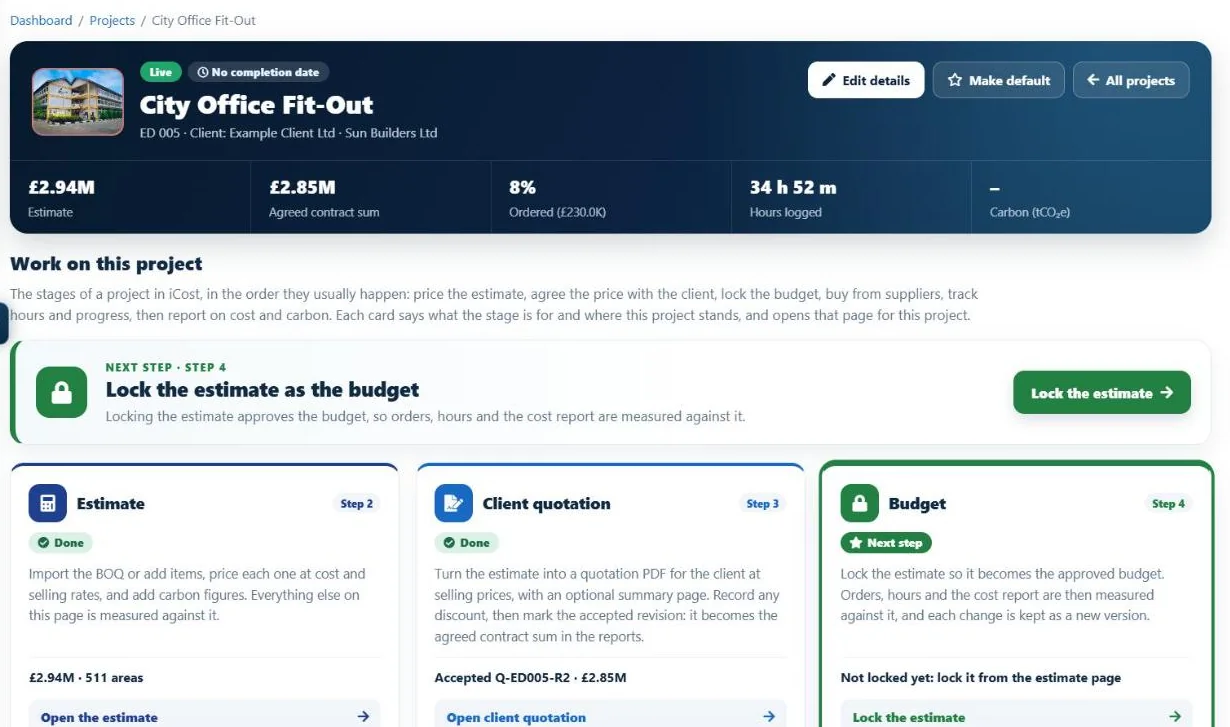
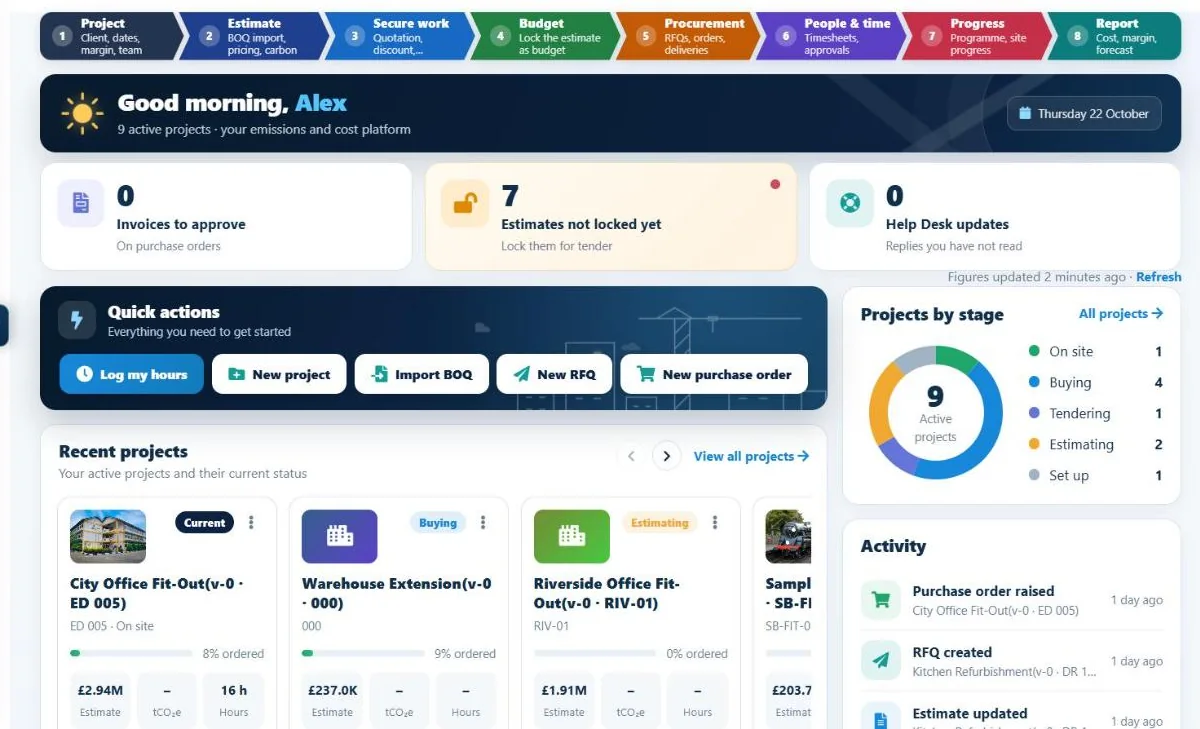
Every project runs through the same eight steps: set up the project, price the estimate, agree the price with the client, lock the budget, buy from suppliers, track hours and progress, then report on cost and carbon. The project page shows where each step stands and the next thing to do.
- Estimate, agreed sum, ordered and hours at a glance
- "Next step" on every project
- Project dates against today
- Roles, permissions and Reviewer access
- Works on phone, tablet and PC
- Team chat on the project
Step by step
How to manage a construction project
in I-Cost.
Set up the project
Client, dates, margin and the people who work on it.
Price and agree
Import the BOQ, price the estimate and send the client quotation. The accepted price becomes the agreed contract sum.
Lock the budget
Lock the estimate as the approved budget everything is measured against.
Buy and build
Ask suppliers for prices, raise orders, record deliveries, log site hours and date the programme.
Report
Committed cost, forecast final cost and forecast margin, with the records behind every figure.
Honest scope
What I-Cost covers,
and what it doesn't.
| Covered in I-Cost | Use another tool for | |
|---|---|---|
| Money | Estimate, client quotation, budget, committed and forecast cost, margin | Accounts and payroll |
| Buying | Supplier quotes, purchase orders, deliveries, invoices, credit notes | |
| Time | Site and staff timesheets with approvals; a simple Gantt programme with progress | Detailed critical-path planning |
| Information | Project documents, photos, team chat | Drawing management, RFIs and snagging |
| Carbon | Embodied carbon on the estimate; whole life carbon assessments (beta) |
Is I-Cost construction project management software?
Yes, for the commercial side of construction projects: estimating, client quotations, supplier management, purchase orders, deliveries, timesheets, the programme, cost tracking and carbon. It does not replace drawing management, RFI or snagging tools.
Is I-Cost suitable for small construction businesses?
Yes. You pay £35 per user per month with no set-up fee, so a team of two costs £70 a month, and you can start with a 7-day free trial on one live project.
Does it replace Microsoft Project or other planning tools?
I-Cost includes a simple programme (Gantt chart) built from the estimate, with dates, progress and late work flagged. For detailed critical-path scheduling you may still want a dedicated planning tool.
Can site teams use it on their phones?
Yes. I-Cost runs in the browser and installs like an app on phone, tablet and PC. Site teams log hours and confirm deliveries from their phone.
How long does it take to get started?
You can sign up, import a BOQ, invite your team and send your first quotation request on the first day, with a guided tutorial showing each step on the real screens.
More of I-Cost
One platform for the whole job.
Everything below works together, from the same estimate. See the full platform.